
CS408 - Human Computer Interaction
2
Topics
29
Posts

Instructions
Assignment covered lecture 25 to 33
Please read the following instructions carefully before submitting assignment:
It should be clear that your assignment will not get any credit if:
o Assignment is submitted after due date.
o Submitted assignment does not open or file is corrupt.
o Assignment is copied (From internet/students).
Objectives:
The objective of this assignment is to:
(a) Enables you to understand Design Principles.
(b) Enable you to understand the significance of navigation.
© Enables you to conduct the trunk test.
Assignment Submission Instructions
You have to submit only .doc/ docx file on the Assignments interface of CS408 at VULMS. Assignment submitted in any other format will not be accepted and will be graded zero marks.
For any query about the assignment, contact only at CS408@vu.edu.pk
Do not post queries related to assignment on MDB.
10 Marks
a) Compare at least five Nielsen’s design principles with the given website design (https://www.ilmkidunya.com/ ). By using your intuition, explain how these principles met or violated by the given website.
b) Let us suppose a scenario that you have to submit your assignment on LMS. Your task is to draw a navigational diagram of your whole process of uploading the assignment.
P8
Question No. 2 10 Marks
You are required to perform Trunk Test on this site (https://www.daraz.pk/), and encircle the area according to the questions asked in test and provide the solution using the screen shots.
Trunk test questions are as follows:
• What site is this? (Site ID)
• What page am I on? (Page name)
• What are the major sections of this site? (Sections)
• What are my options at this level? (Local navigation)
• Where am I in the scheme of things? (“You are here” indicators)

Re: CS408 Assignment 2 Solution and Discussion
Assignment No. 2
Semester: Spring2020
CS408 – Human Computer Interaction
Total Marks: 15
Due Date: 14-06-2020
Instructions
Please read the following instructions carefully before submitting assignment:
It should be clear that your assignment will not get any credit if:
o Assignment is submitted after due date.
o Submitted assignment does not open or file is corrupt.
o Assignment is copied (From internet/students).
Objectives:
The objective of this assignment is to:
(a) Enables you to understand Conceptual models, Design principles.
Assignment Submission Instructions
You have to submit only.doc/ docx file on the Assignments interface of CS408 at VULMS. Assignment submitted in any other format will not be accepted and will be graded zero marks.
For any query about the assignment, contact only at CS408@vu.edu.pk
Do not post queries related to assignment on MDB.
Question No.1 10 Marks
Question No 1: Considering the following scenario, you are required to write the seven stages of action to achieve the goal.
“Suppose, you are going to the university to attempt the exams. On the midway you realized that you forgot the enrollment slip at home. How you will reach in the examination hall on time.” Write down the seven stages of action.
Write your answer in following table.
S.No.
Stage Name
Action
1.
2.
3.
4.
5.
6.
7.
Question No. 2 05 Marks
Following table consists some scenarios related to Design principles. You are required to write down the design principle related to the particular scenario.
S.No.
Scenario Design
Principle
1.
In older version of a work processor, one problem often encounters, when needed to set the properties of a word document, the option of properties should be in the File menu, and often seen it there. But once, file menu opened, it could not show there, it was so confusing. However, when a click on a small arrow at the bottom of file menu, it shows properties option again.
2.
In a website or any app. graphical elements like button, icon, links, and scroll bars are talked about obvious use like as icons should be designed to clicking, scroll bars to moving up and down, buttons to pushing.
3.
A common design practice in graphical user interfaces is to deactivate certain menu options by shading them, thereby restricting the user to only actions permissible at that stage of the activity.
4.
On a computer keyboard, the up and down arrows used to represent the up and down movement of the cursor, respectively.
5.
In a graphical user interface, the same input action always done to highlight any graphical object at the interfaces, such as always clicking the left mouse button to select the icons.
Deadline:
The deadline to submit your assignment is 14th June 2020. Your assignment must be submitted within the due date through VULMS. No assignment will be accepted through email after the due date.
Re: CS408 Assignment 1 Solution and Discussion
Assignment No. 1
Semester: Spring2020
CS408 – Human Computer Interaction
Total Marks: 15
Due Date: 28-05-2020
Instructions
Please read the following instructions carefully before submitting assignment:
It should be clear that your assignment will not get any credit if:
o Assignment is submitted after due date.
o Submitted assignment does not open or file is corrupt.
o Assignment is copied (From internet/students).
Objectives:
The objective of this assignment is to:
(a) Enables you to understand user experience goals
(b) Enable you to find Goals, Operators and Sub-goals.
Assignment Submission Instructions
You have to submit only.doc/ docx file on the Assignments interface of CS408 at VULMS. Assignment submitted in any other format will not be accepted and will be graded zero marks.
For any query about the assignment, contact only at CS408@vu.edu.pk
Do not post queries related to assignment on MDB.
Question No.1 10 Marks
Question No 1:
As we know that Microsoft has updated lots of feature in their every new-updated windows to improve Usability goals and user experience goals to make the user experience more efficient. Your task is to write down two updated features of each window (from window 7 to window 10) that has increased user experience.
Question No. 2 05 Marks
a) Let suppose a scenario that you watch HCI lectures of Virtual University, you have two options you can watch through LMS or YouTube, for the method you have selected, Write down the GOMS (Goals operators, methods and selection) method.
b) Suppose a scenario that you are working in excel sheets, and you have entered many data and before closing the sheet, you forgot to save your data. What are the safety measures Microsoft has designed to ensure to safe user’s data?
Deadline:
The deadline to submit your assignment is Thursday, 28 May 2020. Your assignment must be submitted within the due date through VULMS. No assignment will be accepted through email after the due date.

Speech recognition has been a promising area of text entry for a number of years, however, is still only used in very limited situations. Besides, speech input suggests a number of advantages over other input methods it has limited use in a social environment. Discuss, it is beneficial to use in a social environment or not? Briefly, write only two valid reasons in either case.
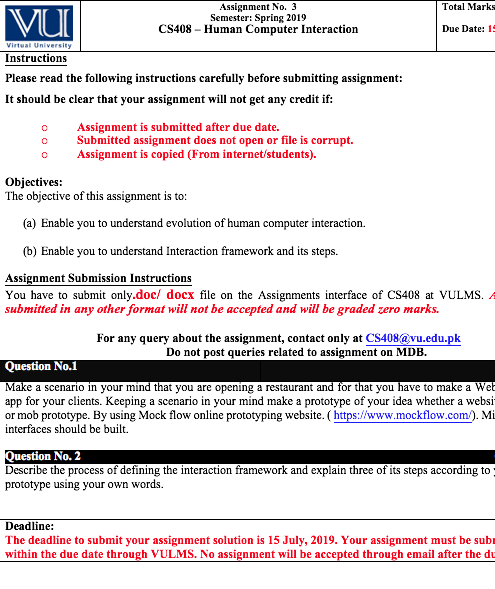
Assignment No. 3
Semester: FALL 2019
CS408 – Human Computer Interaction
Total Marks: 15
Due Date: 20-01-2020
Instructions
Please read the following instructions carefully before submitting assignment:
It should be clear that your assignment will not get any credit if:
o Assignment is submitted after due date.
o Submitted assignment does not open or file is corrupt.
o Assignment is copied (From internet/students).
Objectives:
The objective of this assignment is to:
(a) Enable you to understand the use of Norman’s design principles.
(b) Enable you to understand how to build an interaction framework.
Assignment Submission Instructions
You have to submit only.doc/ docx file on the Assignments interface of CS408 at VULMS. Assignment submitted in any other format will not be accepted and will be graded zero marks.
For any query about the assignment, contact only at CS408@vu.edu.pk
Do not post queries related to assignment on MDB.
Question No.1 10 Marks
Do the following evaluations of Norman’s design principles and fill the table accordingly;
• For the good designed device: state what is good about the design and why you find it well designed.
• For the badly designed device: state what the problem is and why you find it to be a problem.
(For example: Visibility: A TV remote is showing all the operations it can perform with a better sectioning in a good arrangement. Each function can be seen on the remote, but all the functions which are needed and which are needed rarely, it makes your deign a bit complex and difficult for a naïve user to understand.)
Devices
Visibility
Consistency
Constraints
Affordance
Keyboard
Atm machine
Digital watch
Digital camera
Question No. 2 05 Marks
Make a scenario in your mind that you are running mobile shop and want to start it as an online business as well and you have to develop web portal for this. Keeping a scenario in your mind make a Hi -fidelity prototype of your idea. Develop at least 2 interfaces.
Deadline:
The deadline to submit your assignment solution is Monday, 20th January 2020. Your assignment must be submitted within the due date through VULMS. No assignment will be accepted through email after the due date.

Assignment No. 2
Semester: Fall 2019
CS408 – Human Computer Interaction
Total Marks: 15
Due Date: 02-12-2019
Instructions
Please read the following instructions carefully before submitting assignment:
It should be clear that your assignment will not get any credit if:
o Assignment is submitted after due date.
o Submitted assignment does not open or file is corrupt.
o Assignment is copied (From internet/students).
Objectives:
The objective of this assignment is to learn the concept of the psychology of actions and understanding the process of design principles.
Assignment Submission Instructions
You have to submit only.doc/ docx file on the Assignments interface of CS408 at VULMS. Assignment submitted in any other format will not be accepted and will be graded zero marks.
For any query about the assignment, contact only at CS408@vu.edu.pk
Do not post queries related to assignment on MDB.
Question No.1 05 Marks
Analyze the following scenario and write down seven stages of action for given particular scenario for solution.
Scenario is:
Suppose I want to go to market, but the tyre of my car got punctured. Now I have to repair it.
You are required to write the Seven stages of Gulf of Execution and Evaluation to solve the scenario.
Question No. 2 10 Marks
Consider a scenario; you are an HCI specialist in a renowned software house. Here your task is to check out design principles for two given websites.
• https://www.freelancer.pk/
• https://www.fiverr.com/
You are required to explain four Design principles according to the given websites.
Deadline:
The deadline to submit your assignment solution is Monday, 02nd December 2019. Your assignment must be submitted within the due date through VULMS. No assignment will be accepted through email after the due date.
Assignment No. 1
Semester: Fall 2019
CS408 – Human Computer Interaction
Total Marks: 20
Due Date: 11-11-2019
Instructions
Please read the following instructions carefully before submitting assignment:
It should be clear that your assignment will not get any credit if:
o Assignment is submitted after due date.
o Submitted assignment does not open or file is corrupt.
o Assignment is copied (From internet/students).
Objectives:
The objective of this assignment is to:
(a) Identifying roles of input/output channels in Human Computer Interaction
(b) Enable you to find Goals, Operators and Sub-goals.
Assignment Submission Instructions
You have to submit only.doc/ docx file on the Assignments interface of CS408 at VULMS. Assignment submitted in any other format will not be accepted and will be graded zero marks.
For any query about the assignment, contact only at CS408@vu.edu.pk
Do not post queries related to assignment on MDB.
Question No.1 15 Marks
Consider the following scenario:
“Objects Identifier system (a mobile application) is designed to help the blind and visually impaired users to identify objects they encounter in their daily lives (e.g. Cup, Glass, plant or any object).”
You are required to:
a) Choose a suitable combination of input and output devices to best support the intended interaction.
b) What should be the features of the input and output devices that help the blind people to work on the given system?
c) Explain the major problems that the input and output devices solve.
Note: You are supposed to describe at least one input and one output device for the intended interaction.
Solution Table:
Intended Interaction: Objects Identifier system for blind users
(a) Device Name (b) Features © Solved Problems
Input Device(s)
Output Device(s)
Question No. 2 05 Marks
Identify the goals, sub-goals and operators involved in given problem
“Open a File name (HCI-Notes) from D. drive and Update the second paragraph of page no. 20 in a file”.
Use a word processor to update a paragraph and note your actions, goals, sub-goals and operators.
Deadline:
The deadline to submit your assignment is 11th November 2019. Your assignment must be submitted within the due date through VULMS. No assignment will be accepted through email after the due date.
Reputation Earning
 World CUP LIVE Matches

Ads
File Sharing

