


CS310 Quiz 2 Solution and Discussion
-
How will we retrieve the value of session variable set in the following PHP code?
$_SESSION[“color”] = “green”;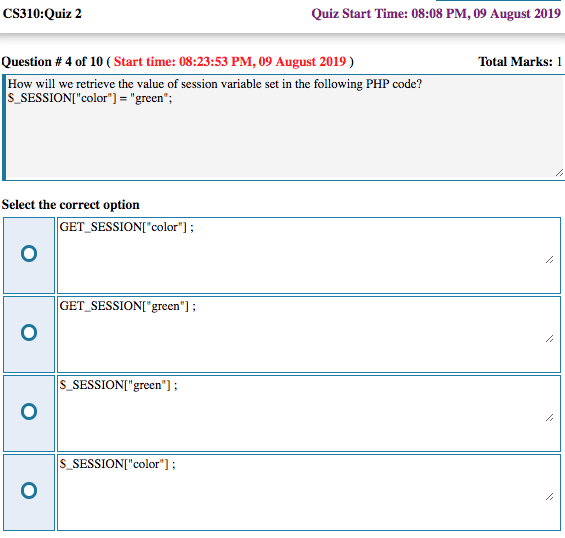
said in CS310 Quiz 2 Solution and Discussion:
How will we retrieve the value of session variable set in the following PHP code?
Retrieve session variable
Answer: (d) $_SESSION[“color”];$
The session variable is stored in the superglobal array $_SESSION with the key “color”. To retrieve its value, you must access this specific array using the same key. The other options use incorrect array names or incorrect keys.To retrieve a session variable in PHP, you access the
$_SESSIONsuperglobal array using the specific key (name) that was used to set it.The Syntax
If your session variable was set like this:
$_SESSION['username'] = "Alex";You retrieve it like this:
echo $_SESSION['username'];
Important Steps for Retrieval
For the value to be accessible, you must follow these two rules:
- Start the Session: You must call
session_start();at the very top of your PHP file before trying to access the$_SESSIONarray. - Check if it Exists: It is best practice to use
isset()to avoid an “Undefined index” error in case the session has expired or wasn’t set.
Example Code:
<?php
session_start(); // Mandatory to access session data

if(isset($_SESSION['username'])) {
    echo "Welcome back, " . $_SESSION['username'];
} else {
    echo "User is not logged in.";
}
?>
Summary of Session Functions
Action PHP Command Start/Resume session_start();Set/Retrieve $_SESSION['key']Remove one variable unset($_SESSION['key']);Destroy all data session_destroy();Would you like me to show you the specific code to set a session variable first, or perhaps how to destroy a session when a user logs out?
- Start the Session: You must call
-
said in CS310 Quiz 2 Solution and Discussion:
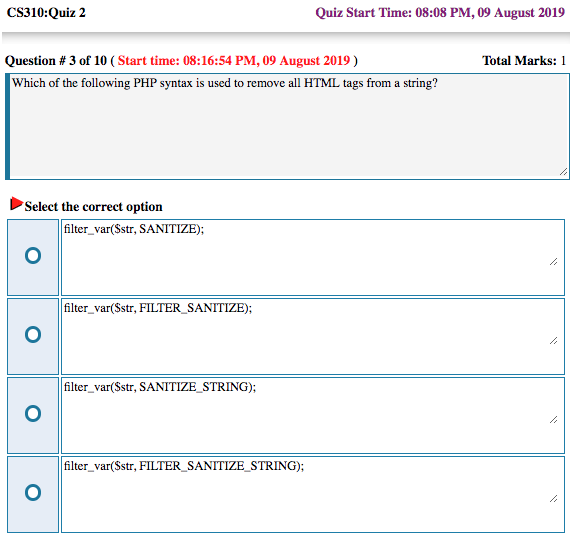
Which of the following PHP syntax is used to remove all HTML tags from a string? CS310
To remove all HTML tags from a string in PHP, you use the
filter_var()function with theFILTER_SANITIZE_STRINGconstant or thestrip_tags()function.1. Using
filter_var()(Standard for sanitization)This is the modern approach for cleaning input data.
$input = "<h1>Hello</h1> <p>World!</p>";
$clean = filter_var($input, FILTER_SANITIZE_STRING);
// Result: "Hello World!"
Note: As of PHP 8.1.0,
FILTER_SANITIZE_STRINGis deprecated. While still common in exam questions (like CS310), the modern replacement ishtmlspecialchars()orstrip_tags().2. Using
strip_tags()(Dedicated function)This is a very common and straightforward function specifically designed to strip HTML and PHP tags from a string.
$input = "<b>Bold Text</b>";
echo strip_tags($input);
// Result: "Bold Text"
Comparison of Methods
Method Best Use Case Key Feature strip_tags()General purpose stripping Allows you to specify “allowable tags” that should NOT be removed. filter_var()Data sanitization pipelines Part of a unified filtering system for emails, URLs, and integers. htmlspecialchars()Security (XSS prevention) Doesn’t remove tags, but converts them to plain text so the browser won’t execute them. Would you like me to show you how to use
strip_tags()while keeping certain tags (like<b>or<i>) intact? -
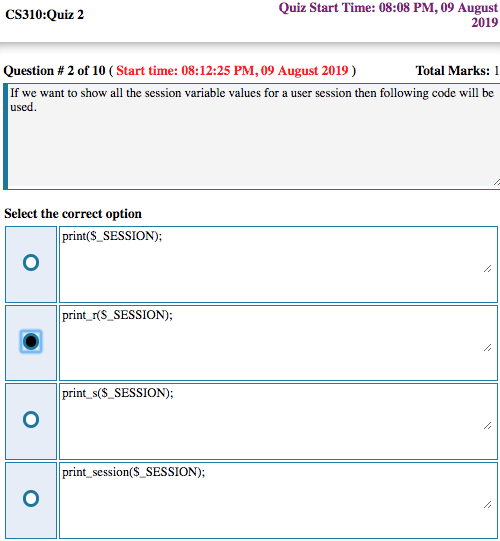
If we want to show all the session variable values for a user session then following code will be used.
print_r($_SESSION);
said in CS310 Quiz 2 Solution and Discussion:
If we want to show all the session variable values for a user session then following code will be used.
To see every variable currently stored in a user’s session, you use the
print_r()orvar_dump()function on the$_SESSIONsuperglobal.These functions allow you to output the entire contents of the associative array in a readable format, which is extremely helpful for debugging.
The Code
<?php
session_start(); // You must always start the session first

// Option 1: Using print_r (Cleanest for reading)
echo "<pre>";
print_r($_SESSION);
echo "</pre>";

// Option 2: Using var_dump (Provides more detail like data types)
var_dump($_SESSION);
?>
Why use
<pre>?When using
print_r()orvar_dump(), wrapping the code in HTML<pre>(preformatted text) tags is a “pro-tip.” It forces the browser to display the array with proper indentation and line breaks, making it much easier for you to read than a single long line of text.Common Session Commands Summary
Purpose Command Start/Resume session_start();Show All Values print_r($_SESSION);Check if a variable exists isset($_SESSION['key']);Clear all values session_unset();Would you like me to show you how to loop through the session variables using a
foreachloop if you want to format the output as a list?
Reputation Earning
 World CUP LIVE Matches

Sponsored
File Sharing

